|
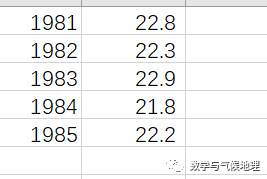
掌握了数据读取的方法后,就需要将数据可视化,进行绘制相应的图形了。 1. 使用Matplotlib绘制简单的折线图:以一组1981-1990年的某地月平均气温数据为例(数据信息如下图所示)。
8 ^4 k/ Z% L% l0 s, c J R, B' k% C0 F' m; ?
/ P. x' Q& J( A, `' E第一步:使用anaconda安装Matplotlib库: - ; F/ \- C$ [* ^
& |4 `2 [2 ]7 l. _
conda install Matplotlib! @* x: K; W; i$ F4 D" O2 k
- F1 H( Z {# g* ]& | c. Y* v3 y1 |& h0 p( F+ {. L; p
9 a6 c7 _( G9 ]! \: D9 O第2步:绘制折线图 subplots()可以在一张图片中绘制一个或多个图表 fig表示整张图片,ax表示图片中的各个图表 plot()根据给定的数据以有意义的方式绘制图表 只输入一个列表时ax.plot(squares),假设第一个数据点对应x坐标为0 同时提供输入和输出ax.plot(input_values, squares) - 2 Y, v* @2 P5 y: I8 J
. w' \0 \' z( P1 v' r
# b' w: j1 `7 d" u5 o
/ t9 f* T! k& j/ d( m$ ~! k- , ]1 b3 j% @! P, F' `9 @
/ L1 {$ @5 P" E/ H
5 v4 H" b4 ^- l3 }( I7 R; [- ; w5 X, h, x3 ]
- D, Q! ]5 \3 q! X& u: O# v
- 4 k+ ^- D$ ?, o5 @
4 n% G, d) y# g! [3 s
import matplotlib.pyplot as pltx_values = [1981, 1982, 1983, 1984, 1985]y_values = [22.8, 22.3, 22.9, 21.8, 22.2]fig, ax = plt.subplots() #绘制画布,地图ax.plot(x_values, y_values, linewidth=3)ax.set_title("1981-1985 temperature", fontsize=24) #标题ax.set_xlabel("time(year)", fontsize=14) #坐标轴标签ax.set_ylabel("temperature(℃)", fontsize=14)ax.tick_params(axis='both', labelsize=14) #刻度标记plt.show()+ a( j8 C/ w" C2 c$ H8 |
代码读取后显示:

: X5 A3 W0 S7 I
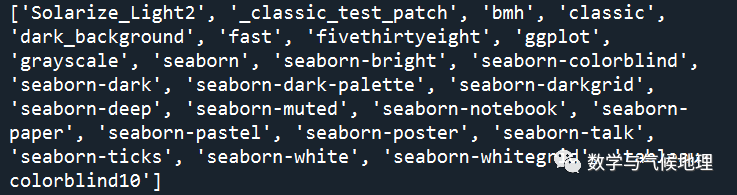
第3步:使用内置的不同图形样式绘制折线图 1、显示所有的不同样式的图形,共有20张
- v E5 c" J1 o9 t3 K8 ~9 J
0 T b! A o2 g. g; H- 6 [' a3 Q5 b3 t
- : l; ]) b% x6 ^( @
- 1 @! }/ V' ^# C6 [
- 9 H, R3 h3 m0 V& n% z
- # A+ _% X6 g4 ~ p1 l
- ! e/ k# C, Z1 `3 _& O
- ) j8 H! E D1 J" |$ b' Z7 X' g: L
! E. G7 M2 ]' E5 `% b5 O- . K- X2 ^& `5 i, @/ t" j7 |$ U
% X' P4 F6 l: z+ p$ P Z4 W- / p7 {7 C7 Z' ^
) E3 M3 h; \6 u$ a- % r; K+ ]; s1 t1 j8 ~" t
8 [# \/ W. D* P- x
, R; D7 H/ c: p7 v
4 j7 ?1 b. V8 b1 s+ X; h- 6 f' Q( i* G S( q: j
4 i( ~1 X' x* Q/ q: }" ?- 6 _! J9 E+ B) m* p
- . Z! x; Z( s$ Q! L! L
- 8 _) [" ?! ~: R% ? D
' B7 @- f6 R+ p% z/ g. w+ l6 y6 p. o+ \' b$ r# @
import matplotlib.pyplot as pltx_values = [1981, 1982, 1983, 1984, 1985]y_values = [22.8, 22.3, 22.9, 21.8, 22.2]fig, ax = plt.subplots()ax.plot(x_values, y_values, linewidth=3)# 使用内置样式画图print(plt.style.available) #显示有哪些可用的内置样式mystyles = plt.style.availablefor mystyle in mystyles:plt.style.use(mystyle) #使用内置样式fig, ax = plt.subplots()ax.plot(x_values, y_values)ax.set_ylabel("temperature(℃)", fontsize=14)ax.set_xlabel("Value") #坐标轴标签ax.set_ylabel("Square of Value")ax.tick_params(axis='both') #刻度标记plt.show()
( ?4 T* C% g+ s0 ^% ? 所有的内置样式有(print(plt.style.available)):
9 x2 N. |1 F1 `: [" j# W
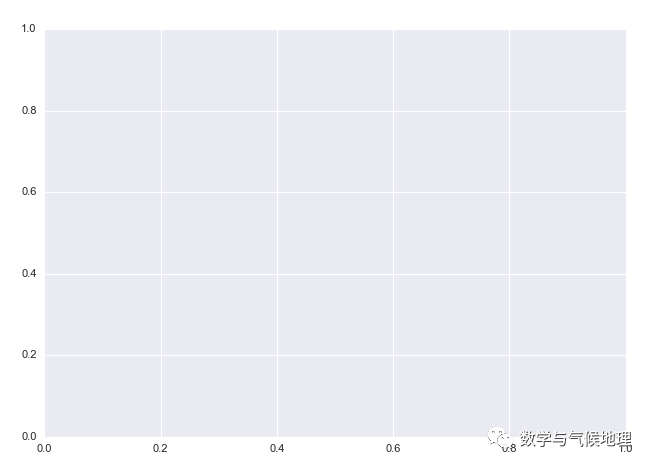
2、选择其中一种样式(plt.style.use(‘样式名字’)): 如'Solarize_Light2': - / |; y& M) I+ I+ S- [5 Q
! U7 b( J2 o" ~% i, G! f+ I
' Q+ M7 a$ l& l# C# C% J* p+ \
plt.style.use('seaborn') #使用内置样式fig, ax = plt.subplots()
: B4 B1 l) c! ] Z A
# K: l5 S' L- u, B) g5 D! @( b如'bmh':
+ v/ Q3 x# }4 ^+ d, |
, |4 z) A5 z9 o. ~+ ~
! }3 X1 O- w: {! Y8 z( b! Z/ T
plt.style.use('bmh') #使用内置样式fig, ax = plt.subplots(): R5 K5 _7 t$ _0 c1 V) C( i I P
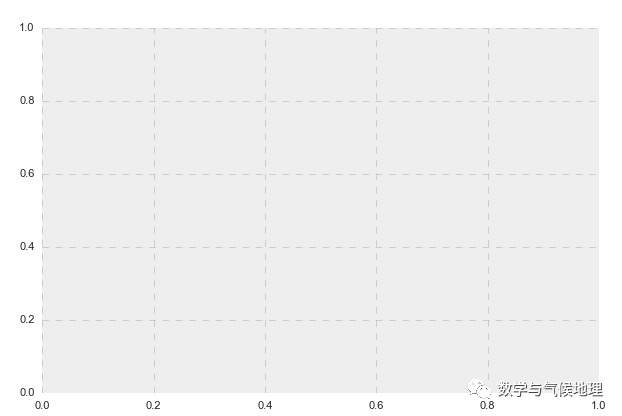
其余的样式同理可得。 . r* s6 c0 O6 v- w6 {
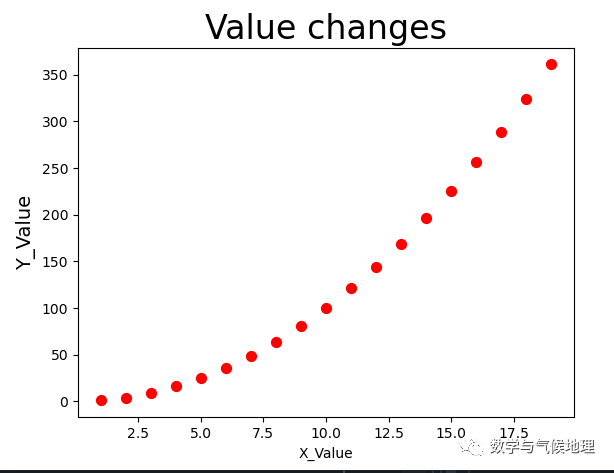
第4步:使用Matplotlib绘制简单的散点图
- [ E( p* M# Y; h- ( \9 c1 w, O! |; O: q' G+ [ a
, `' F8 W' y# u0 i
|6 d+ s1 k- W* t3 n- * _+ g3 D* S$ l) E3 ^5 s
5 @; q( ^0 B2 R2 M" S: \% C B1 \' b* ~- / q( a( @8 S' u7 f4 v% B5 E2 K' [
6 G( q. [; j; w/ n" K% R. h- # [ {& [# F1 o$ C9 c
- + o. J; m) a% k3 w8 p
- " Z! e: |) G3 G C
- ! E4 B8 {# B8 O4 g
- ) l0 h. w$ ?" N1 w) v
2 V& r; ]) \6 F1 t1 g; y6 I$ e
import matplotlib.pyplot as pltx_values = range(1, 20) #取连续的1-20的整数y = [x**2 for x in x_values] #x值的二次方为y值plt.style.use('fast') #使用内置样式fig, ax = plt.subplots()ax.scatter(x_values, y, c='red', s=50)#绘制散点图,传递x和y坐标,点的尺寸s#颜色c,可用设置为'red',(0, 0.8, 0)ax.set_title("1981-1985 temperature", fontsize=24) #标题ax.set_xlabel("Value") #坐标轴标签ax.set_ylabel("temperature(℃)", fontsize=14)ax.tick_params(axis='both') #刻度标记plt.show()
1 h' G& e5 b0 U1 L, |3 W 注:内置样式可以更换,这里选择的是‘fast’。
i" z/ D, \4 k# l' \/ y |